Archexa Documentation
Archexa is a CLI tool for architectural intelligence. It analyzes any repository — statically, then semantically — and gives you instant insight into structure, patterns, dependencies, and change impact.
Overview
Archexa works in two phases: a fast static analysis pass using Tree-sitter AST parsing across 15+ languages, followed by an optional LLM reasoning layer that interprets architectural intent. The result is structured Markdown with Mermaid diagrams, tables, and file citations.
OPENAI_API_KEY environment variable — no config file changes needed.Quick Start
Installation
macOS
macOS 12+ · Intel & Apple Silicon
Linux
Ubuntu 20+, Debian, RHEL, Alpine
Windows
Windows 10+ · WSL2
| Requirement | Minimum | Status |
|---|---|---|
| Operating System | macOS 12, Ubuntu 20.04, Windows 10 | Supported |
| Architecture | x86_64, arm64 (Apple Silicon) | Supported |
| LLM API Key | OpenAI-compatible or Ollama | For AI features |
| Disk space | ~20MB | Minimal |
Configuration
Archexa reads from archexa.yaml in your project root. Run archexa init to generate a starter config.
OPENAI_API_KEY in your environment. Works with any OpenAI-compatible API — OpenAI, Anthropic (via OpenRouter), Azure, Ollama, vLLM, LM Studio.Configuration Reference
Full archexa.yaml with all available options and documentation.
| Section | Key Fields | Description |
|---|---|---|
| project | base_path, entry_files | Repository root and optional entry points |
| llm | model, base_url, ssl_verify | LLM provider settings (any OpenAI-compatible API) |
| limits | max_files, max_prompt_tokens, safety_margin | Token budget and file limits |
| evidence | max_bytes_per_file, max_blocks_per_file, block_lines | How source code is parsed and sampled |
| output | out, show_evidence_summary | Output directory and format options |
| prompts | gist_prompt, query_prompt, impact_prompt, review_prompt, diagnose_prompt | Custom instructions per command |
| query | question, target | Default question and target for query command |
| review | target | Default target files for review |
| diagnose | logs, trace, error, last, tz | Log file, stack trace, time window, timezone |
| service | focus | Limit analysis to specific directories |
| agent | enabled, max_iterations | Deep mode (--deep) settings |
| cache | enabled | Evidence caching for repeated runs |
Commands
archexa gist
Generates a high-level architectural summary in 5–15 seconds. Detects stack, patterns, module boundaries, and coupling hotspots.
archexa query
Ask natural language questions answered with precise architectural context and file citations.
archexa analyze
Two-phase pipeline for comprehensive architecture documentation with Mermaid diagrams, component tables, and data flows.
archexa impact
Traces the full blast radius of a file change. Shows direct dependents, transitive impact, and risk assessment.
archexa review
Architecture-aware code review. Finds security vulnerabilities, resource leaks, interface mismatches. Every file gets a verdict.
archexa diagnose
Feed it a stack trace, log file, or error message. Traces call chains and explains the root cause with fix recommendations.
archexa chat
Interactive multi-turn codebase exploration with memory. Auto-detects topic switches.
Advanced
Deep Mode (--deep)
Every command supports --deep — a multi-step agentic reasoning pass that reads actual file content for richer output.
| Aspect | Pipeline (default) | Deep (--deep) |
|---|---|---|
| Speed | 5–15 seconds | 30–120 seconds |
| LLM calls | 1–2 | 10–50+ |
| Agent tools | — | read_file, grep_codebase, list_directory, find_references |
| Best for | High-level overviews | Tracing execution flows, code-level detail |
JSON Output
All commands support --format json for machine-readable output. Review findings emit structured JSON with --json-findings for IDE integration.
CI/CD Integration
LLM Configuration
Archexa works with any OpenAI-compatible API. The model you choose directly determines the accuracy, depth, and quality of the generated architecture documentation — stronger models produce more insightful analysis with better architectural reasoning.
| Model | Output Quality | Best for |
|---|---|---|
| GPT-4o | Excellent | Strong all-round analysis with detailed diagrams and tables |
| Claude Sonnet 4 | Excellent | Highly detailed technical docs with nuanced architectural reasoning |
| GPT-4.1 | Excellent | Well-structured output with clean tables and precise references |
| GPT-4o-mini | Good | Quick gists and simple queries where speed matters more than depth |
| Gemini 2.5 Flash | Good | Fast analysis with solid architectural understanding |
| Ollama (local) | Varies | Air-gapped environments where no data can leave your machine |
analyze) and deep investigations, use a high-capability model like GPT-4o or Claude Sonnet 4. For quick gists and simple queries, a smaller model works well.Custom Prompts
Override system prompts per command in archexa.yaml. Each command has its own prompt key: gist, query, user (analyze), impact, review, diagnose.
VS Code Extension
Archexa for VS Code Available
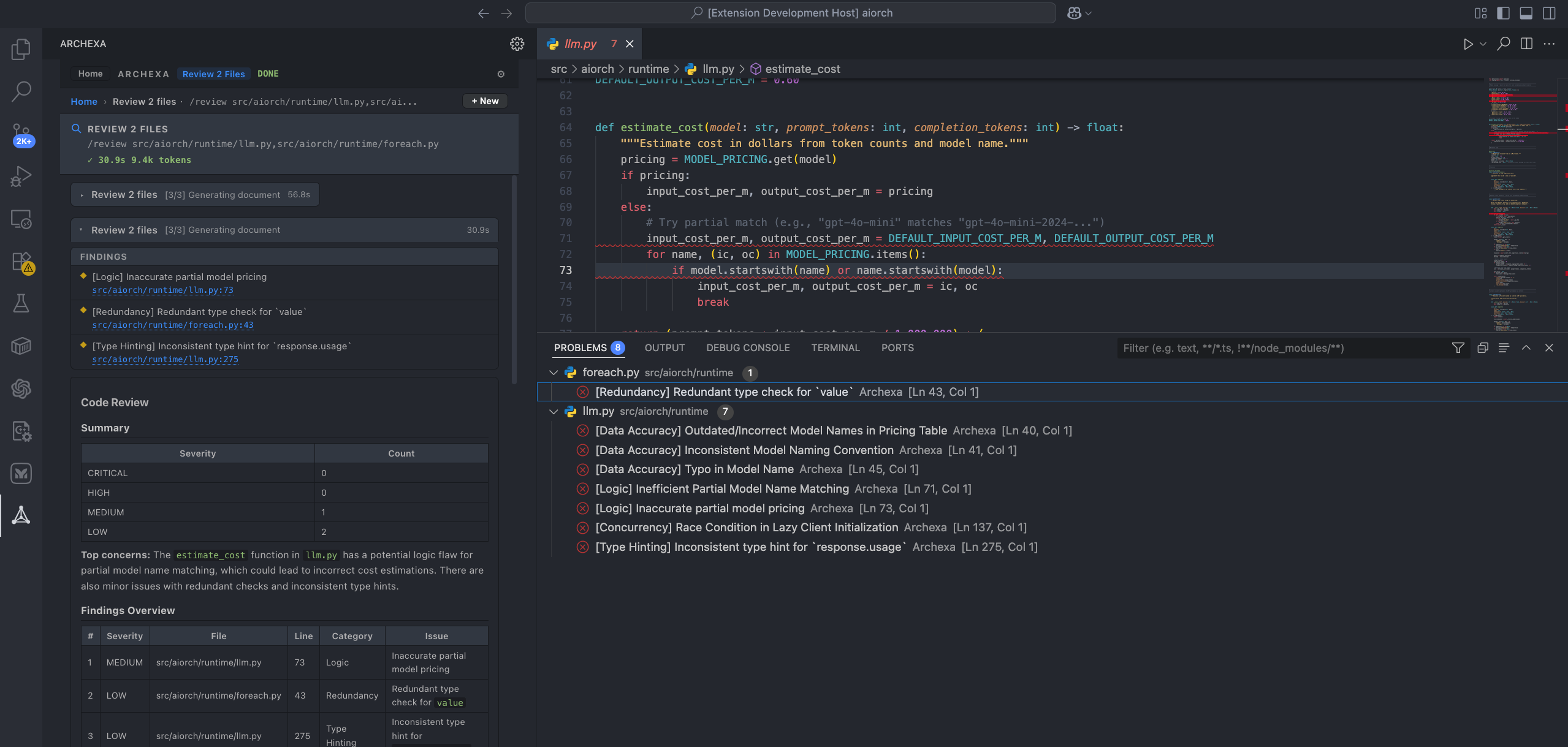
- ✓Inline findings — editor squiggles in Problems panel
- ✓Command Palette — Gist, Query, Impact, Review, Diagnose
- ✓Sidebar Panel — command wizard, chat, settings, history
- ✓Context menu — right-click any file to review, diagnose, or query
- ✓Keyboard shortcuts —
Cmd+Shift+D,R,Q,I - ✓Auto binary download — ~20 MB on first use, setup wizard included
Ctrl+Shift+X), search “Archexa”, click Install.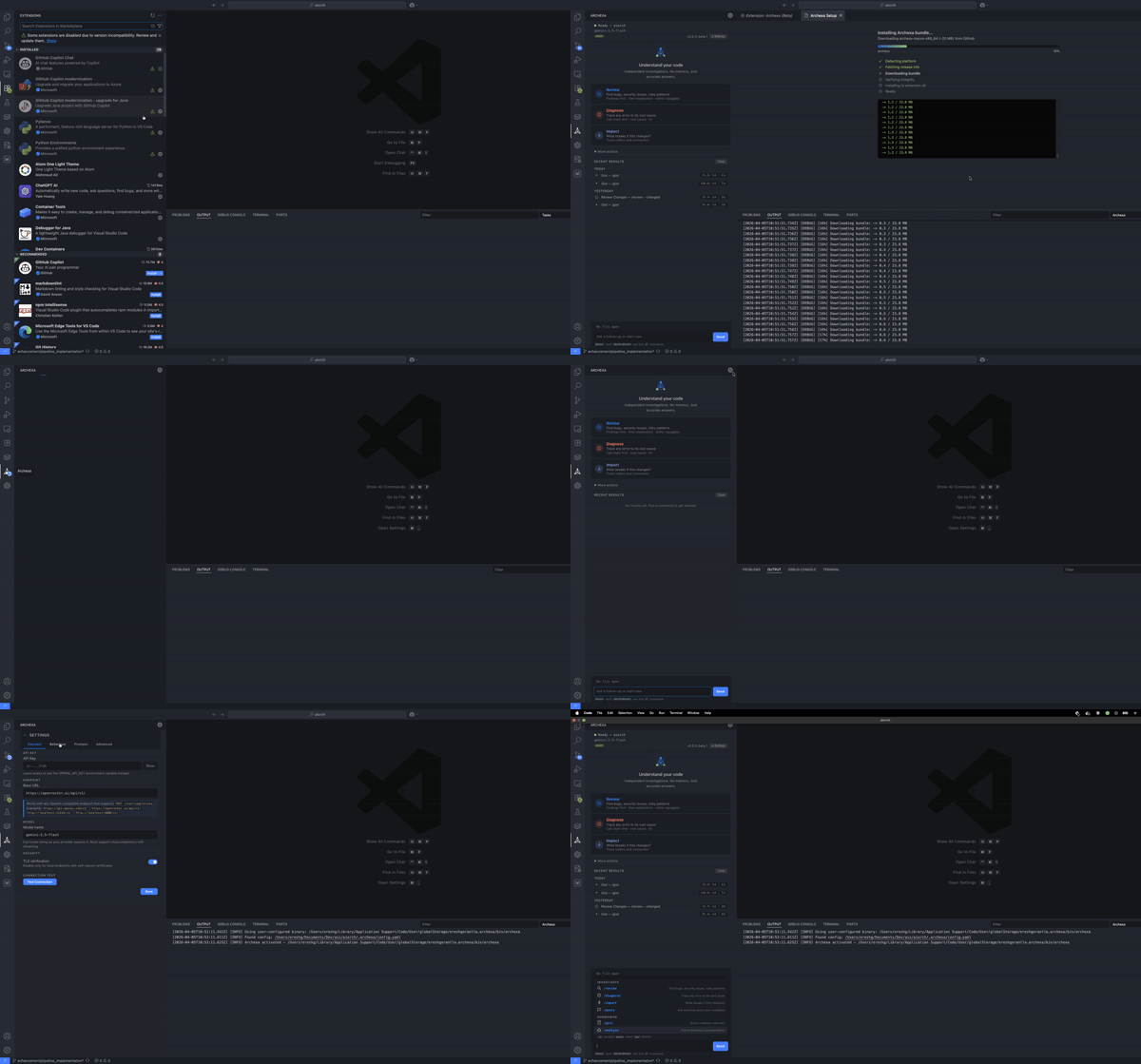
Extension Settings
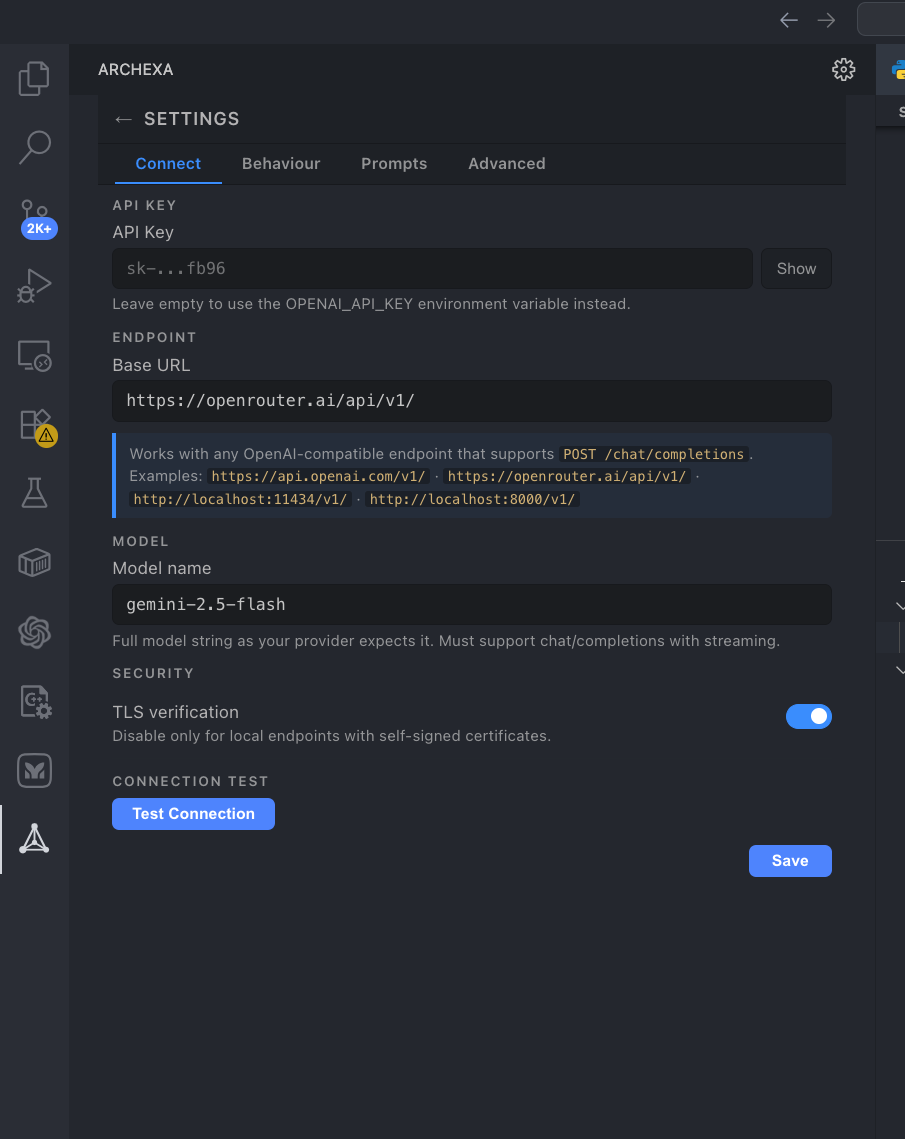
| Setting | Default | Description |
|---|---|---|
| archexa.apiKey | — | API key (or use env var) |
| archexa.model | gpt-4o | LLM model name |
| archexa.endpoint | https://api.openai.com/v1/ | API base URL |
| archexa.deepByDefault | true | Use deep mode by default |
| archexa.showInlineFindings | true | Show editor squiggles |
| archexa.autoReviewOnSave | false | Auto-review on file save |
Sidebar Panel
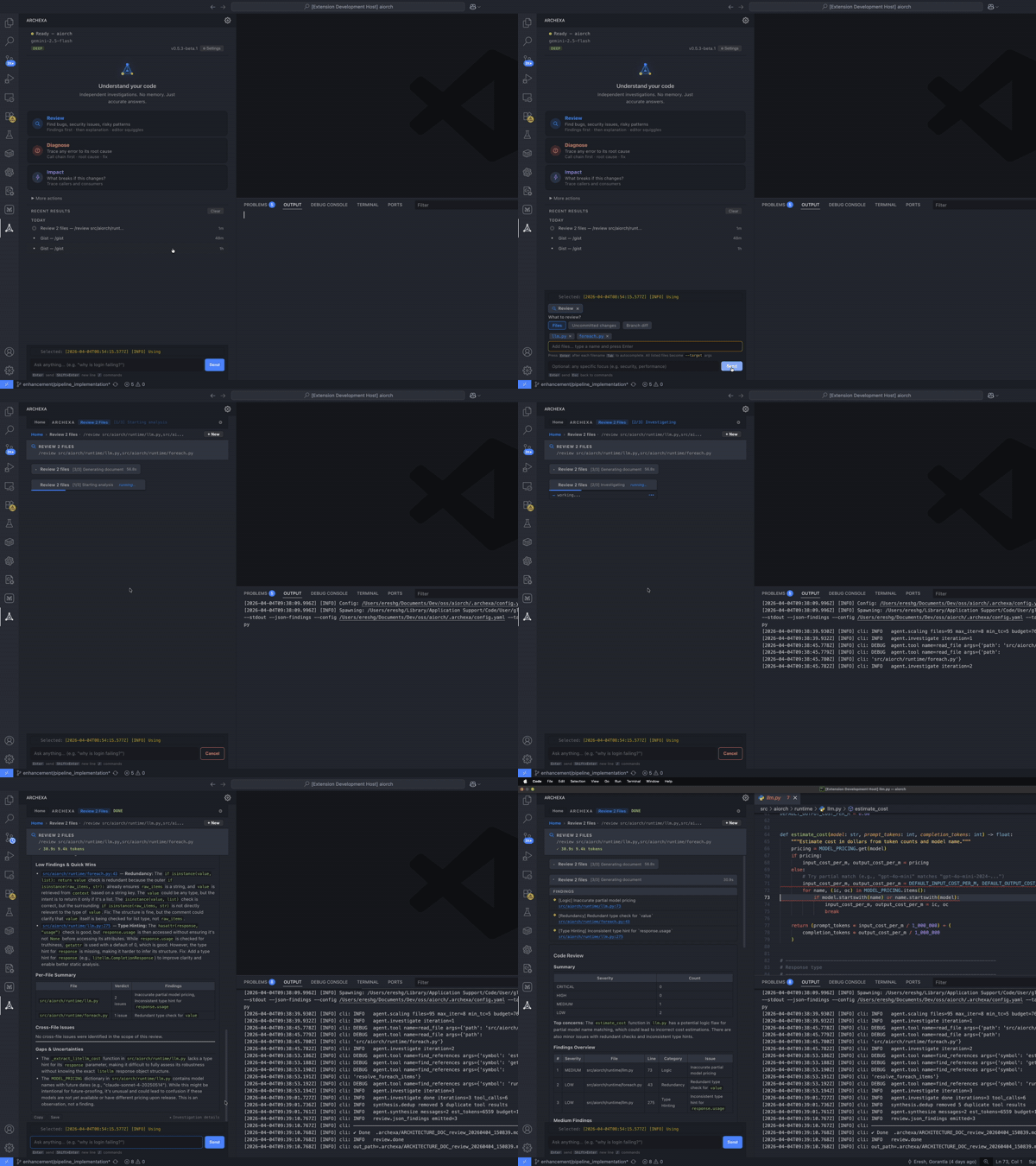
Review Findings
Findings appear as inline editor squiggles and in the Problems panel with severity levels.